
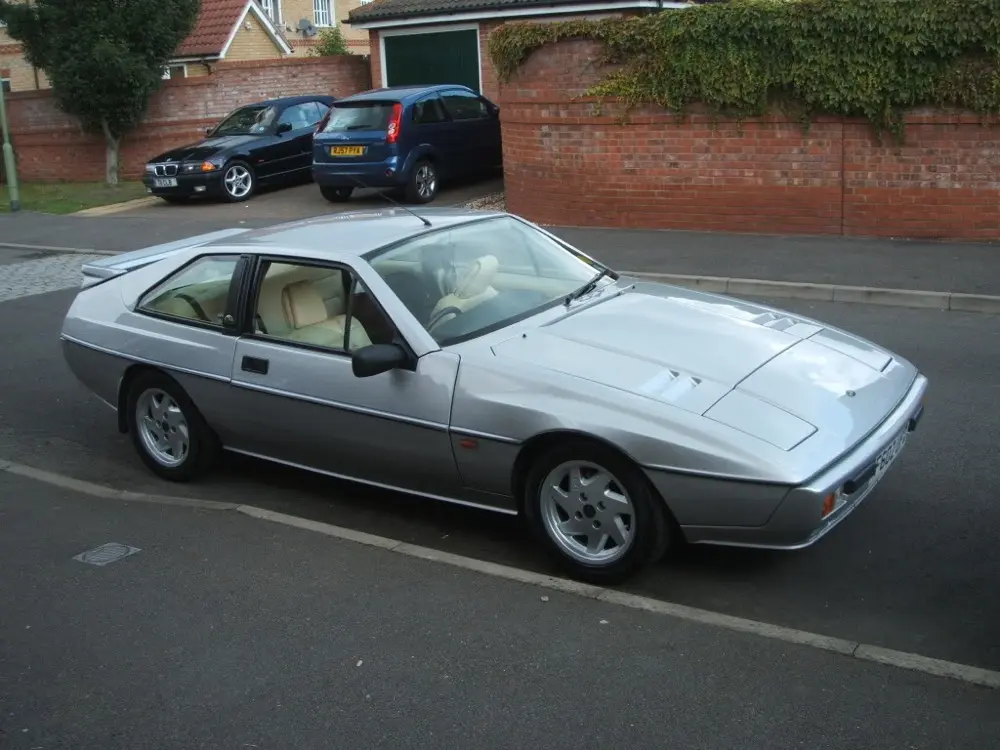
The Type 89 Lotus Excel, built from 1982 to 1992, is a front-engined, rear-wheel drive sports car designed and built by Lotus. It was based on the design of the earlier Lotus Eclat, which itself was based on the earlier Lotus Elite II. During its lifetime, the Excel received two major upgrades. With the introduction of the Excel SE (a 180 bhp (134 kW; 182 PS) engine vs the standard 160 bhp (119 kW; 162 PS) engined car) in October 1985, the bumpers, wing and interior was changed, including a new dashboard. In October 1986 the Excel SA with automatic gearbox was introduced.
Frequently Asked Questions
How do I adjust the headlights on my Lotus Excel?
To adjust the headlights on your Lotus Excel, park the vehicle on a level surface facing a wall or garage door. Measure and mark the height of the headlights on the wall, ensuring the marks correspond to the center of each headlight. Locate the vertical and horizontal adjustment screws near the headlight assembly and use a screwdriver or wrench to adjust the beams up, down, left, or right, as needed. Repeat the process for both headlights, ensuring they are properly aligned according to the Lotus Excel automotive repair manual’s specifications.
How do I adjust the valve clearances on my Lotus Excel?
To adjust the valve clearances on your Lotus Excel, start by removing the valve cover to gain access to the valves. Rotate the engine until the valves of the cylinder you are working on are in the closed position. Use a feeler gauge to measure the clearance between the valve stem and the camshaft lobe, adjusting it by tightening or loosening the adjusting screw on the rocker arm. Repeat this process for each valve, ensuring the correct clearance specified in the Lotus Excel automotive repair manual is achieved.
How do I bleed the brakes on my Lotus Excel?
To bleed the brakes on your Lotus Excel, start with the brake furthest from the master cylinder, which is typically the rear passenger side. Attach a clear plastic tube to the bleeder valve and submerge the other end in a container partially filled with brake fluid. Have a helper press and hold the brake pedal while you open the bleeder valve to allow air and old fluid to escape. Close the valve, then repeat the process for each brake, moving from the furthest to the closest. Refer to the Lotus Excel automotive repair manual for the recommended bleeding sequence and additional instructions.
How do I change the oil in my Lotus Excel?
To change the oil in your Lotus Excel, start by warming up the engine to ensure the oil flows easily. Then, locate the drain plug underneath the engine and place a drain pan underneath. Remove the drain plug and allow the old oil to completely drain out. Once drained, replace the drain plug and fill the engine with the recommended amount of fresh oil, making sure to use the correct viscosity and grade specified in the Lotus Excel automotive repair manual.
How do I check and top up the coolant in my Lotus Excel?
To check and top up the coolant in your Lotus Excel, ensure the engine is cool before opening the coolant reservoir cap. The coolant level should be between the minimum and maximum marks on the reservoir. If it is low, add a mixture of coolant and distilled water as specified in the Lotus Excel automotive repair manual. It is important to use the correct coolant type and follow the recommended coolant replacement interval to prevent overheating and engine damage.
How do I replace a burnt-out headlight on my Lotus Excel?
To replace a burnt-out headlight on your Lotus Excel, open the hood and locate the back of the headlight assembly. Depending on the model year, you may need to remove a cover or unplug electrical connectors. Once you have access to the bulb, twist the socket counterclockwise to remove it and then carefully remove the old bulb. Insert the new bulb, making sure not to touch the glass with bare hands, and reinstall the socket and any necessary covers or connectors. Consult the Lotus Excel automotive repair manual for further guidance if needed.
How do I replace the air filter in my Lotus Excel?
To replace the air filter in your Lotus Excel, locate the air filter housing, which is usually situated near the engine. Unfasten the clips or screws that secure the housing, then carefully lift off the cover. Remove the old air filter and clean any debris from the housing. Insert the new air filter, ensuring it is properly aligned, and reattach the cover. Following the steps outlined in the Lotus Excel automotive repair manual will help ensure correct installation and optimum air filtration.
How do I replace the brake pads on my Lotus Excel?
To replace the brake pads on your Lotus Excel, start by loosening the lug nuts on the wheel, then raise the vehicle and securely support it on jack stands. Remove the wheel to access the brake caliper. Next, unbolt the caliper and carefully remove it, being cautious not to damage the brake line. Replace the old brake pads with new ones, ensuring they are correctly aligned, and then reassemble the caliper and wheel as per the Lotus Excel automotive repair manual instructions.
How do I replace the cabin air filter in my Lotus Excel?
To replace the cabin air filter in your Lotus Excel, locate the filter compartment, which is typically situated behind the glove box or beneath the dashboard. Remove the access panel or cover to reveal the filter. Slide out the old cabin air filter and discard it. Install the new filter, ensuring it is properly aligned and facing the correct direction as indicated by the arrows on the filter. Reattach the access panel or cover, following the Lotus Excel automotive repair manual instructions.
How do I replace the drive belt on my Lotus Excel?
To replace the drive belt on your Lotus Excel, start by locating the belt tensioner, which is typically a spring-loaded pulley. Use a wrench or socket to release tension on the belt by rotating the tensioner in the appropriate direction. Once the tension is relieved, slide the old belt off the pulleys. Install the new belt by following the belt routing diagram in the Lotus Excel automotive repair manual, ensuring it sits correctly on each pulley. Finally, release the tensioner to apply tension to the new belt.
How do I replace the spark plugs in my Lotus Excel?
To replace the spark plugs in your Lotus Excel, locate the spark plug wires or coil-on-plug assemblies on top of the engine. Carefully disconnect the wires or connectors and use a spark plug socket and ratchet to remove the old spark plugs. Check the gap on the new spark plugs using a gap tool, and adjust if necessary. Install the new spark plugs by hand, then tighten them with the spark plug socket. Reconnect the wires or connectors as per the Lotus Excel automotive repair manual’s instructions.
How do I reset the service indicator on my Lotus Excel?
To reset the service indicator on your Lotus Excel, turn the ignition to the “on” position without starting the engine. Locate the service indicator button typically found on the instrument cluster. Press and hold the button until the service indicator light starts to flash or a message appears on the display. Release the button, then press and hold it again until the light stops flashing or the message disappears. Consult the Lotus Excel automotive repair manual for specific instructions if needed.
How do I troubleshoot an electrical issue in my Lotus Excel?
When troubleshooting an electrical issue in your Lotus Excel, start by checking the fuse box for any blown fuses. If all fuses are intact, inspect the battery terminals for corrosion or loose connections. Ensure the battery is fully charged and the alternator is functioning properly. If the issue persists, consult the Lotus Excel automotive repair manual’s electrical wiring diagrams to identify potential problem areas and perform further diagnostic tests using appropriate tools and equipment.
How often should I change the transmission fluid in my Lotus Excel?
It is generally recommended to change the transmission fluid in a Lotus Excel every 30,000 to 60,000 miles or every 2 to 3 years, depending on driving conditions and manufacturer guidelines. However, it is essential to refer to the Lotus Excel automotive repair manual for the specific service interval and fluid type recommended for your vehicle. Regular transmission fluid changes help maintain smooth shifting, reduce wear, and prolong the life of the transmission.
What is the recommended tire pressure for a Lotus Excel?
The recommended tire pressure for a Lotus Excel is typically 32 psi for the front tires and 34 psi for the rear tires. However, it is important to consult the Lotus Excel automotive repair manual for the specific tire pressure recommendations based on the vehicle’s weight and load. Proper tire pressure ensures optimal handling, fuel efficiency, and tire longevity.
