
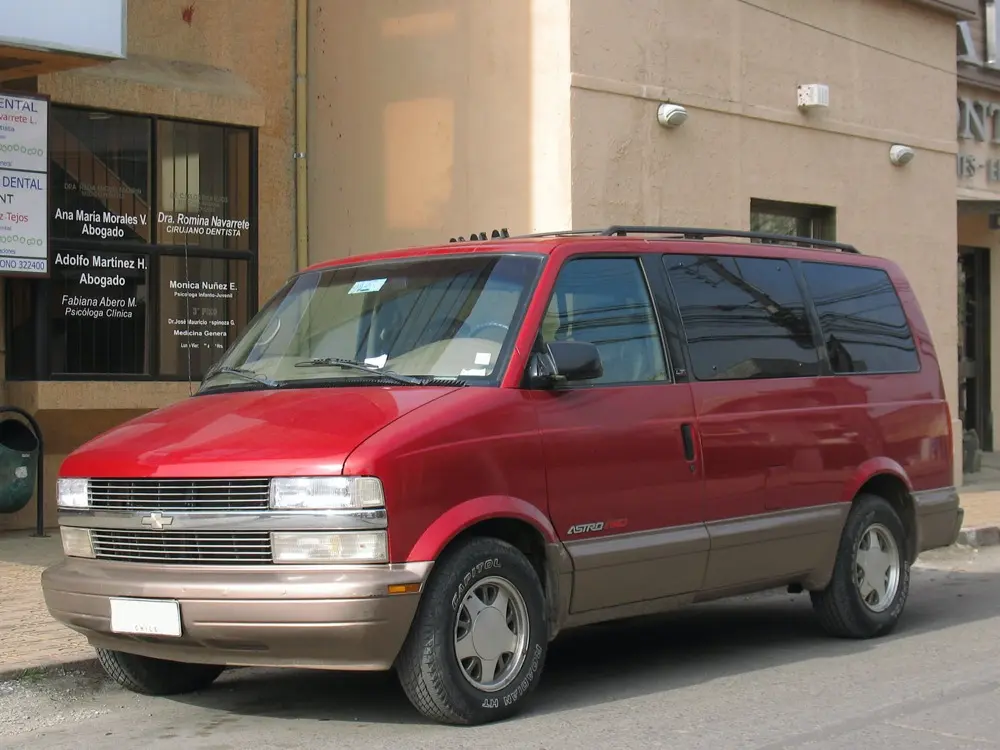
The Chevrolet launched it rear-wheel drive mid size van Chevrolet in 1985 to 2005 provide tough competition to its rival Dodge Caravan, Plymouth Voyager twins and the Japanese Toyota Van. The platform was developed based on its sibling GMC Safari. The size of the Astro was ranged between the Chevrolet Venture minivan and Chevy van. The Chevrolet Astro was built out of powertrain components that are similar to Ford Aerostar. In testing performed by the National Highway Traffic Safety Administration (NHTSA), however, the Astro and Safari fared better, improving from a single-star rating in 1991 to a three-star (driver) and four-star (passenger) rating by 2000. In side impacts, the Astro and Safari both received the highest, five-star rating in every year that the test was administered.
Frequently Asked Questions
How do I change the oil on a Chevrolet Astro?
Changing the oil on a Chevrolet Astro involves draining the old oil, replacing the oil filter, and refilling with new oil. The oil filter is located on the bottom of the engine, and the drain plug is located on the oil pan. It is important to use the recommended oil and oil filter for optimal performance.
How do I replace the alternator on a Chevrolet Astro?
To replace the alternator on a Chevrolet Astro, first disconnect the battery and remove the serpentine belt. Then, remove the alternator mounting bolts and disconnect the wiring harness. Install the new alternator and reattach the wiring harness and mounting bolts.
How do I replace the brake pads on a Chevrolet Astro?
To replace the brake pads on a Chevrolet Astro, first remove the wheel and then the brake caliper. Compress the caliper piston and install the new pads. Reattach the caliper and wheel and repeat the process on the other side.
How do I replace the distributor cap and rotor on a Chevrolet Astro?
To replace the distributor cap and rotor on a Chevrolet Astro, first remove the distributor cap and then the rotor. Install the new rotor and cap, making sure to position them correctly. It is important to use the recommended cap and rotor for optimal performance.
How do I replace the fuel filter on a Chevrolet Astro?
To replace the fuel filter on a Chevrolet Astro, first relieve the fuel pressure by disconnecting the fuel pump fuse or relay. Then, locate the fuel filter and remove the old filter. Install the new filter and reconnect the fuel pump fuse or relay.
How do I replace the power steering pump on a Chevrolet Astro?
To replace the power steering pump on a Chevrolet Astro, first remove the serpentine belt and disconnect the hoses and wiring harness. Remove the mounting bolts and lift the old pump out. Install the new pump and reattach the hoses, wiring harness, and serpentine belt.
How do I replace the radiator on a Chevrolet Astro?
To replace the radiator on a Chevrolet Astro, first drain the coolant and disconnect the hoses and transmission lines. Remove the mounting bolts and lift the old radiator out. Install the new radiator and reconnect the hoses, transmission lines, and coolant.
How do I replace the serpentine belt on a Chevrolet Astro?
To replace the serpentine belt on a Chevrolet Astro, first locate the tensioner pulley and use a wrench to release the tension. Remove the old belt and install the new belt, following the belt routing diagram. Use the tensioner pulley to tighten the belt to the proper tension.
How do I replace the spark plugs on a Chevrolet Astro?
To replace the spark plugs on a Chevrolet Astro, first remove the spark plug wires. Then, use a spark plug socket to remove the old spark plugs. Install the new spark plugs and reattach the spark plug wires. It is important to use the recommended spark plugs for optimal performance.
How do I replace the starter on a Chevrolet Astro?
To replace the starter on a Chevrolet Astro, first disconnect the battery and remove the wiring harness and mounting bolts. Install the new starter and reattach the wiring harness and mounting bolts. Reconnect the battery and test the starter.
How do I replace the thermostat on a Chevrolet Astro?
To replace the thermostat on a Chevrolet Astro, first drain the coolant and remove the thermostat housing. Remove the old thermostat and install the new thermostat, making sure to position it correctly. Reinstall the thermostat housing and refill the coolant.
How do I replace the water pump on a Chevrolet Astro?
To replace the water pump on a Chevrolet Astro, first drain the coolant and remove the serpentine belt. Remove the water pump mounting bolts and disconnect the hoses and wiring harness. Install the new water pump and reattach the hoses, wiring harness, and serpentine belt. Refill the coolant.
How do I troubleshoot a faulty air conditioning system in a Chevrolet Astro?
To troubleshoot a faulty air conditioning system in a Chevrolet Astro, first check the refrigerant level and pressure. If the level and pressure are normal, check the compressor, condenser, and evaporator for damage or leaks. It may also be necessary to check the electrical components, such as the fuses and relays.
What causes the check engine light to come on in a Chevrolet Astro?
The check engine light in a Chevrolet Astro can come on for a variety of reasons, including a faulty oxygen sensor, loose or damaged gas cap, or a malfunctioning catalytic converter. It is important to have the vehicle diagnosed by a professional to determine the exact cause.
What is the recommended tire pressure for a Chevrolet Astro?
The recommended tire pressure for a Chevrolet Astro is 35 PSI. This ensures proper handling, fuel efficiency, and tire wear. It is important to check tire pressure regularly and adjust as necessary.
