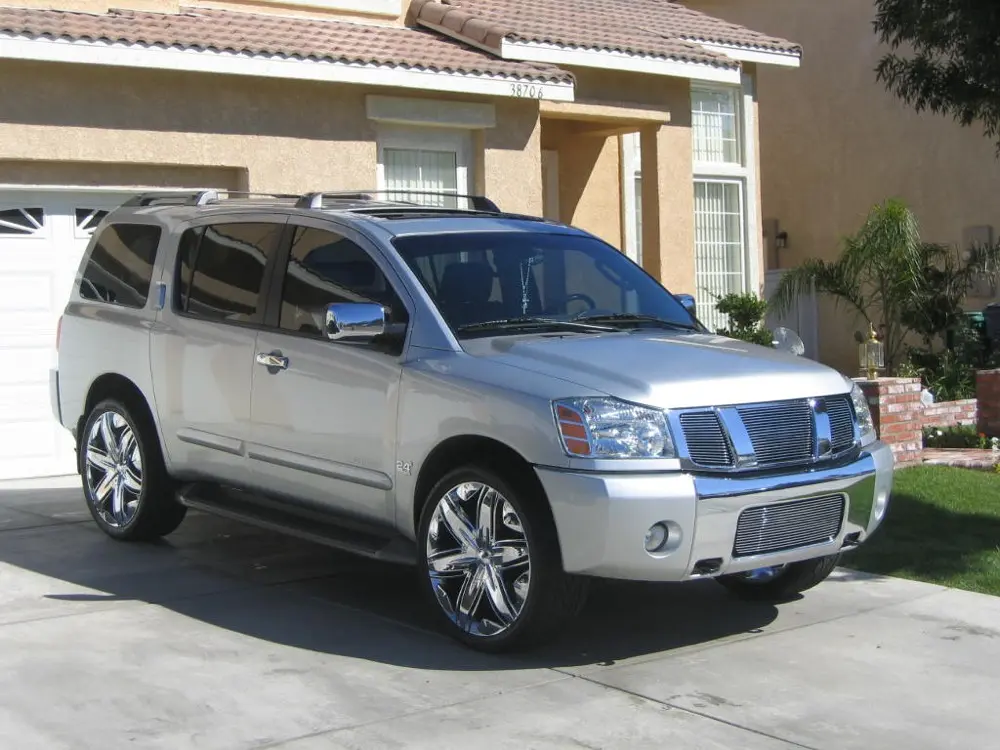
The Nissan Armada is Nissan’s full-size SUV. It shares its body-on-frame F-Alpha platform with the Nissan Titan pickup truck, Nissan Xterra SUV, Nissan Frontier pickup truck, and Nissan Pathfinder SUV. An upscale version of the Armada was sold as the Infiniti QX56 from 2004 to 2010, when it switched to a platform based on the Nissan Patrol. The Armada has a 5.6 L, 317 hp (236 kW), 385 lb ft (522 N m) torque VK56DE V8 engine, a 5-speed automatic transmission, and a choice of rear-wheel drive or four-wheel drive. All Armadas are currently built in Canton, Mississippi.
Frequently Asked Questions
How do I check the coolant level in my Nissan Armada?
To check the coolant level in your Nissan Armada, make sure the engine is cool and the vehicle is on a level surface. Open the hood and locate the coolant reservoir, which is typically a translucent plastic container. The coolant level should be between the minimum and maximum marks on the reservoir. If the level is low, add a 50/50 mixture of coolant and distilled water to bring it to the appropriate level.
How do I check the transmission fluid level in my Nissan Armada?
To check the transmission fluid level in your Nissan Armada, start the engine and allow it to reach operating temperature. Then, locate the transmission dipstick, usually found near the back of the engine compartment. Pull out the dipstick, wipe it clean, reinsert it fully, and then remove it again to check the fluid level. The correct fluid level should be within the designated range indicated on the dipstick.
How do I jump-start my Nissan Armada?
To jump-start your Nissan Armada, you will need a set of jumper cables and a functioning vehicle with a charged battery. Park the assisting vehicle close to your Armada, ensuring the two batteries are as close as possible. Connect the positive (+) cable to the positive terminal of both batteries, and then connect the negative (-) cable to the negative terminal of the assisting vehicle’s battery and a metal ground on your Armada. Start the assisting vehicle, let it run for a few minutes, and then attempt to start your Armada.
How do I program a new key fob for my Nissan Armada?
To program a new key fob for your Nissan Armada, sit inside the vehicle and close all doors. Insert the key into the ignition and turn it to the ON position without starting the engine. Within 10 seconds, press and hold the LOCK button on the new key fob for at least 5 seconds. Release the button, and then turn the ignition OFF. The key fob should now be programmed and ready to use.
How do I replace a burnt-out headlight bulb in my Nissan Armada?
To replace a burnt-out headlight bulb in your Nissan Armada, open the hood and locate the back of the headlight assembly. Twist off the bulb socket counterclockwise and carefully remove it from the assembly. Disconnect the old bulb and connect the new one, ensuring it is securely in place. Finally, reinsert the bulb socket into the assembly and twist it clockwise to secure it.
How do I replace the cabin air filter in my Nissan Armada?
To replace the cabin air filter in your Nissan Armada, locate the filter housing, which is typically located behind the glove compartment. Remove the glove compartment by compressing the sides and lowering it. Then, locate the filter housing cover and remove it by unclipping or unscrewing it. Take out the old cabin air filter and replace it with a new one, ensuring it is properly aligned. Finally, reinstall the filter housing cover and the glove compartment.
How do I replace the windshield wipers on my Nissan Armada?
To replace the windshield wipers on your Nissan Armada, lift the wiper arms away from the windshield. Locate the release tab or button on the wiper blade assembly and press or push it to release the old blade. Slide the old blade off the wiper arm and slide the new blade onto the arm, ensuring it securely locks in place. Finally, lower the wiper arms back onto the windshield.
How do I reset the maintenance reminder light on my Nissan Armada?
To reset the maintenance reminder light on your Nissan Armada, turn the ignition switch to the ON position without starting the engine. Fully press the accelerator pedal to the floor and release it three times within 10 seconds. The maintenance reminder light should start flashing, indicating that it has been reset. It is important to note that this procedure may vary slightly depending on the model year and specific trim level of your vehicle.
How often should I change the oil in my Nissan Armada?
It is recommended to change the oil in your Nissan Armada every 5,000 to 7,500 miles, or approximately every 6 months, whichever comes first. Regular oil changes help maintain engine performance and longevity, as well as optimize fuel efficiency. Following the manufacturer’s recommended oil change interval will ensure proper lubrication and protection for your vehicle’s engine.
How often should I replace the air filter in my Nissan Armada?
The air filter in your Nissan Armada should be replaced approximately every 15,000 to 30,000 miles, depending on driving conditions. A dirty or clogged air filter can restrict airflow to the engine, impacting performance and fuel efficiency. Regularly inspecting and replacing the air filter will help ensure optimal engine performance and prolong the life of your vehicle’s engine.
How often should I replace the brake pads on my Nissan Armada?
The frequency of brake pad replacement on your Nissan Armada depends on various factors, including driving habits, road conditions, and brake pad material. As a general guideline, brake pads should be inspected at least every 25,000 miles or annually. If the brake pads have less than 2-3mm of friction material remaining, they should be replaced to ensure safe braking performance.
How often should I replace the spark plugs in my Nissan Armada?
The spark plugs in your Nissan Armada should generally be replaced every 60,000 to 100,000 miles, depending on the specific model and engine type. Worn or faulty spark plugs can lead to misfires, reduced fuel efficiency, and engine performance issues. Regularly inspecting and replacing the spark plugs will help maintain smooth engine operation and maximize fuel economy.
What is the recommended tire pressure for my Nissan Armada?
The recommended tire pressure for your Nissan Armada can typically be found on a sticker located on the driver’s side door jamb or in the owner’s manual. It is important to maintain the proper tire pressure as specified by the manufacturer, as underinflated or overinflated tires can affect handling, fuel efficiency, and tire wear. Regularly checking and adjusting tire pressure will help ensure safe and optimal driving conditions.
What is the towing capacity of my Nissan Armada?
The towing capacity of your Nissan Armada depends on the specific model and trim level. Generally, the towing capacity ranges from 8,500 to 9,000 pounds. It is important to consult your owner’s manual or contact a Nissan dealership to determine the exact towing capacity of your vehicle, as it may vary depending on the equipment and configuration.
What type of fuel should I use in my Nissan Armada?
Your Nissan Armada is designed to run on unleaded gasoline with an octane rating of 87 or higher. Using a fuel with a lower octane rating can lead to engine knocking and reduced performance. It is important to avoid using diesel fuel, as it is not compatible with gasoline engines and can cause severe damage.
