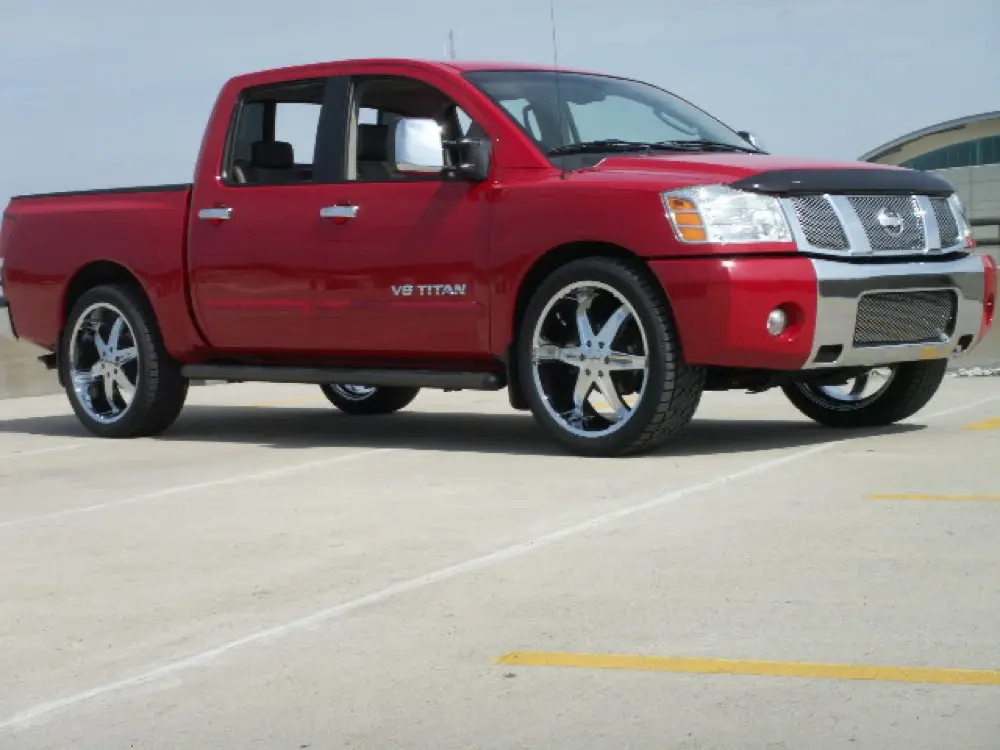
The Nissan Titan is a full-size pickup truck manufactured in the United States for the North American market by Nissan. The Titan was introduced in 2003. All Titans come standard with a 32-valve, 5.6-litre engine, VK56DE, which generates 317 hp (236 kW) (305 hp or 227 kW on 2004 2006 models). An automatic brake-limited slip (ABLS) is available on all Titans. The Titan is available as a king cab or a crew cab with a full-sized back seat; no regular cab is available. There were originally four trim levels available: the S, SV, Pro-4x, SE and LE. The SE and LE trim levels have since been replaced by the luxury SL trim. Its top speed is listed as 185 km/h, and it can accelerate from 0 to 100 km/h in 15.3 seconds.
Frequently Asked Questions
How do I change a flat tire on a Nissan Titan?
To change a flat tire on a Nissan Titan, first, locate the spare tire, jack, and lug wrench. Loosen the lug nuts slightly before jacking up the vehicle using the designated jack points. Once the vehicle is lifted, completely remove the lug nuts, take off the flat tire, and replace it with the spare tire. Tighten the lug nuts in a star pattern, lower the vehicle, and then fully tighten the lug nuts to the recommended torque. It is crucial to consult the manual for specific instructions and precautions when changing a tire on a Nissan Titan.
How do I change the oil in a Nissan Titan?
To change the oil in a Nissan Titan, start by locating the oil drain plug underneath the engine. Remove the plug and allow the old oil to drain completely. Once drained, replace the drain plug and refill the engine with the recommended amount and type of oil specified in the manual. It is important to also replace the oil filter during an oil change to ensure optimal performance and engine longevity.
How do I check the battery in a Nissan Titan?
To check the battery in a Nissan Titan, start by locating the battery under the hood. Inspect the battery terminals for any signs of corrosion or loose connections. Using a multimeter set to the DC voltage mode, connect the positive (red) probe to the positive terminal of the battery and the negative (black) probe to the negative terminal. Check the voltage reading displayed on the multimeter. If the battery voltage is below 12.4 volts, it may indicate a weak or discharged battery that may require charging or replacement. It is important to consult the manual for any specific battery maintenance procedures or recommended testing methods for your Nissan Titan model.
How do I check the engine oil level in a Nissan Titan?
To check the engine oil level in a Nissan Titan, park the vehicle on a level surface and ensure the engine is turned off and cooled down. Locate the engine oil dipstick, usually marked with a bright-colored handle, and pull it out. Wipe the dipstick clean, reinsert it fully, and then pull it out again. Check the oil level
How do I check the transmission fluid level in a Nissan Titan?
To check the transmission fluid level in a Nissan Titan, ensure that the vehicle is on a level surface and the engine is warmed up to operating temperature. With the engine running, locate the transmission dipstick, usually marked with a bright-colored handle, and pull it out. Wipe the dipstick clean, reinsert it fully, and then pull it out again. Check the fluid level indicated on the dipstick against the recommended range in the manual. If the fluid level is low, add the appropriate transmission fluid through the dipstick tube, being cautious not to overfill. Remember to consult the manual for specific fluid types and procedures for your Nissan Titan model.
How do I jump-start a Nissan Titan?
To jump-start a Nissan Titan, begin by parking a vehicle with a fully charged battery close to the dead vehicle. Ensure that both vehicles are turned off and the parking brakes are engaged. Connect one end of the positive (red) jumper cable to the positive terminal of the dead battery and the other end to the positive terminal of the charged battery. Then, connect one end of the negative (black) jumper cable to the negative terminal of the charged battery and the other end to a solid, unpainted metal surface on the dead vehicle away from the battery. Start the engine of the charged vehicle and let it run for a few minutes before attempting to start the dead vehicle. Once the dead vehicle is running, carefully remove the jumper cables in the reverse order of connection. It is essential to consult the manual for any specific precautions or recommendations for your Nissan Titan model.
How do I replace a headlight bulb on a Nissan Titan?
To replace a headlight bulb on a Nissan Titan, first, open the hood and locate the headlight assembly. Remove the electrical connector by gently releasing the tab and pulling it away from the bulb. Next, twist the bulb socket counterclockwise and carefully remove the old bulb. Insert the new bulb into the socket, making sure it is securely in place, and then reattach the socket into the headlight assembly by turning it clockwise. Finally, reconnect the electrical connector and test the headlight to ensure proper functionality. It is recommended to consult the manual for specific bulb types and procedures for your particular Nissan Titan model.
How do I replace the air filter on a Nissan Titan?
To replace the air filter on a Nissan Titan, open the hood and locate the air filter housing, which is usually a rectangular box near the engine. Release the clips or screws securing the housing cover and remove the cover. Take out the old air filter and replace it with a new one, ensuring it is installed correctly. Reattach the housing cover and ensure all clips or screws are securely fastened. It is advisable to consult the manual for specific filter types and detailed instructions for your Nissan Titan model.
How do I replace the cabin air filter on a Nissan Titan?
To replace the cabin air filter on a Nissan Titan, first, locate the cabin air filter housing, which is typically located behind the glove compartment. Open the glove compartment and remove any contents or stops that may be in the way. Next, release the tabs or screws securing the filter housing cover and remove the cover. Take out the old cabin air filter and replace it with a new one, ensuring it is installed in the correct orientation. Finally, reattach the filter housing cover and reinstall the glove compartment. It is advisable to consult the manual for specific filter types and detailed instructions for your Nissan Titan model.
How do I replace the windshield wipers on a Nissan Titan?
To replace the windshield wipers on a Nissan Titan, lift the wiper arm away from the windshield and locate the release tab or button on the wiper blade assembly. Depress the tab or button and slide the wiper blade down the arm to detach it. Attach the new wiper blade by sliding it onto the wiper arm until it clicks into place. Gently lower the wiper arm back onto the windshield. Repeat the process for the other wiper blade if necessary. It is advisable to consult the manual for specific wiper blade sizes and any additional steps or precautions for your Nissan Titan model.
How do I reset the maintenance light on a Nissan Titan?
To reset the maintenance light on a Nissan Titan, start by turning the ignition switch to the “ON” position without starting the engine. Then, fully depress the accelerator pedal to the floor and release it three times within a span of five seconds. After releasing the accelerator pedal for the third time, wait for about 10 seconds, and the maintenance light should reset. It is important to note that the exact procedure might vary slightly depending on the model year of your Nissan Titan, so referring to the manual for the specific reset instructions is recommended.
How often should I replace the brake pads on my Nissan Titan?
The frequency of brake pad replacement for your Nissan Titan depends on various factors such as driving habits, road conditions, and pad material. However, as a general guideline, it is recommended to inspect the brake pads every 10,000 miles and replace them if the thickness is less than 1/8 inch. Additionally, if you notice any signs of brake noise, reduced braking performance, or uneven wear, it is crucial to have the pads checked and replaced if necessary to ensure safe braking.
What is the recommended tire pressure for a Nissan Titan?
The recommended tire pressure for a Nissan Titan can vary depending on the specific model and tire size. However, as a general reference, most Nissan Titan models typically require a tire pressure of around 35 PSI (pounds per square inch) for optimal performance and fuel efficiency. It is essential to regularly check and adjust the tire pressure according to the manufacturer’s recommendations to ensure proper tire wear, handling, and safety.
What type of coolant should I use for my Nissan Titan?
For your Nissan Titan, it is recommended to use a high-quality ethylene glycol-based coolant that is compatible with aluminum engines. Refer to the manual for the specific coolant specifications and the correct coolant-to-water ratio. Regularly checking the coolant level and inspecting for any signs of contamination or leaks is essential to prevent overheating and maintain the engine’s cooling system efficiency.
